Why your SAP CAP app returns 403 Forbidden after deploy, and how to fix it
A SAP CAP app returns 403 Forbidden when the user is logged in but their token does not carry a role that your CDS model asks for in @requires or @restrict. On SAP BTP with XSUAA, a role only reaches a user through a chain of five links, from the CDS annotation to a fresh login. The fix is to find the broken link, and it is almost always one of the five below.
Getting 401 Unauthorized instead? That means no valid user token reached CAP at all, which is a different problem. It usually means the approuter does not forward the token. See the checklist in Catch SAP BTP deployment mistakes before cf deploy.
What the 403 looks like
CAP checks roles in two places, and they fail differently.
Service-level @requires is checked first. If the user is logged in but has none of the required roles, CAP rejects the request with status 403 and a message that names the roles. This is the message text from CAP's source (@sap/cds 9), and it appears in the app log (cf logs <app> --recent):
User 'maria@example.com' is lacking required roles: [Admin]If the user is not logged in at all, the same check returns 401 instead.
Entity-level @restrict returns a plain 403 without a reason. CAP only logs the reason (Access denied to user ... for event ...) when debug logging is on for its app logger. To see it on Cloud Foundry, set the DEBUG environment variable and restage:
cf set-env orders-srv DEBUG app
cf restage orders-srv
cf logs orders-srv --recent
Remove the variable again when you are done.
The chain from a CDS role to a user
Take this service, from the example project used throughout this article:
service OrderService @(requires: 'authenticated-user') {
  entity Orders @(restrict: [
    { grant: 'READ', to: 'SalesRep', where: 'country = $user.country' },
    { grant: '*', to: 'SalesManager' }
  ]) as projection on my.Orders;
}

service AdminService @(requires: 'Admin') {
  entity Orders as projection on my.Orders;
}
For a user to pass @requires: 'Admin', every link below must be in place:
| # | Link | Where it lives |
|---|---|---|
| 1 | A scope $XSAPPNAME.Admin | xs-security.json |
| 2 | A role template that references that scope | xs-security.json |
| 3 | A role collection that contains the role template | xs-security.json, mta.yaml or the BTP cockpit |
| 4 | The role collection assigned to the user | BTP cockpit, or your identity provider's groups |
| 5 | A token issued after the assignment | The user logs out and in again |
CAP compares the role name with the scope name after the $XSAPPNAME. prefix, and the comparison is case-sensitive. admin in CDS does not match $XSAPPNAME.Admin.
The five breaks that cause it
1. The role is missing from xs-security.json
The most common cause. A role was added to a CDS annotation after xs-security.json was generated, and nobody regenerated or updated it. Nobody can be given a role that has no scope, so every request that needs it fails.
Add the scope and a role template for it:
"scopes": [
  { "name": "$XSAPPNAME.Admin", "description": "Administrator" }
],
"role-templates": [
  { "name": "Admin", "description": "Administrator", "scope-references": ["$XSAPPNAME.Admin"] }
]
You can also regenerate the file from the model with cds compile srv --to xsuaa and merge the result. Then redeploy, or run cf update-service for the XSUAA instance.
2. A reference has a typo
A role template points to $XSAPPNAME.SalesManagr, or a role collection to a role template that does not exist. This one usually does not reach production as a 403: XSUAA rejects the whole descriptor, and the deploy fails while creating or updating the XSUAA service instance, with a service broker error that names the invalid reference.
Fix the reference to match the scope or role template name exactly.
3. The role template is in no role collection, or the collection is not assigned
The role template exists, but users only receive role templates through role collections. Either define a role collection in xs-security.json:
"role-collections": [
  { "name": "Orders Admin", "role-template-references": ["$XSAPPNAME.Admin"] }
]
or create one in the BTP cockpit under Security > Role Collections. Then assign the collection to the user under Security > Users, or map it to a group from your identity provider.
4. The user still has an old token
Role assignments are written into the token when the user logs in. A user who was assigned a role collection five minutes ago still carries the old token until they log out and in again, or the session expires.
5. A user attribute is not defined
where: 'country = $user.country' reads an attribute from the token. If xs-security.json defines no attribute country, or no role template passes it on, the user never carries it. The condition matches no rows, so the user sees empty lists or gets 403 on single records. Define the attribute and reference it from the role template:
"attributes": [
  { "name": "country", "description": "Country", "valueType": "string" }
],
"role-templates": [
  { "name": "SalesRep", "scope-references": ["$XSAPPNAME.SalesRep"], "attribute-references": ["country"] }
]
Users then get the value through their role collection or identity provider.
One more trap: the token is from another XSUAA instance
mta.yaml often sets xsappname: orders-${org}-${space}, so each space gets its own XSUAA application. CAP turns a scope into a role by removing its own application's prefix, so a token issued for the dev space carries scopes like orders-dev!t123.Admin that never become the role Admin in the test space. If you test with a token you fetched for another space or app, every role check fails even though the role looks right.
Find the broken link in seconds with Auth Studio
Checking five links by hand across .cds files, xs-security.json, mta.yaml and the cockpit is slow. I built Auth Studio for SAP BTP, a free extension for VS Code and SAP Business Application Studio, to do it in one view.
Open xs-security.json and click the shield icon in the editor title bar. The Roles tab lists every role your CDS model checks, where it is used, and whether it has a scope, a role template and a role collection:
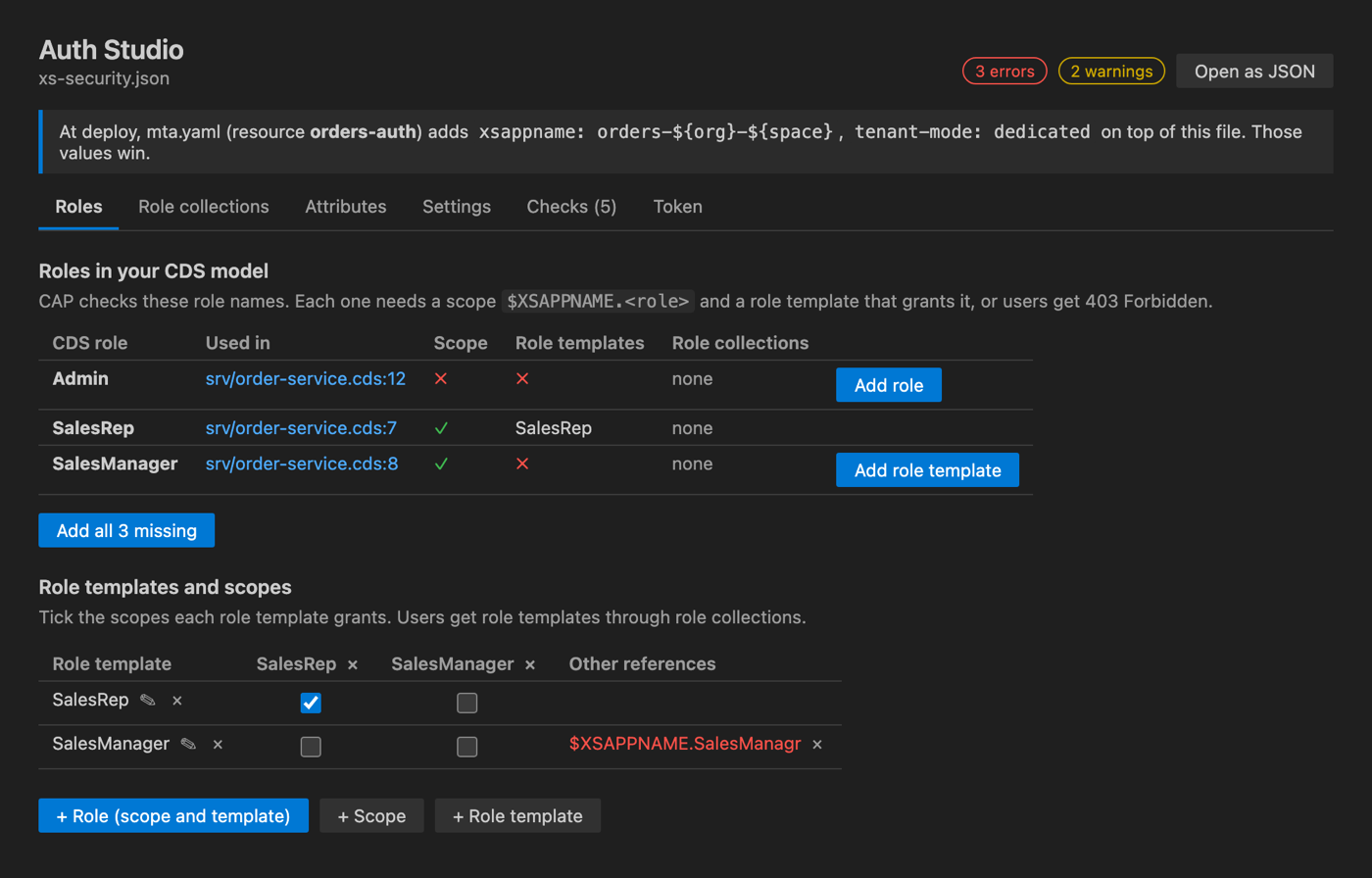
In this example project it finds three of the breaks at once: Admin (break 1), the SalesManager template pointing to a misspelled scope (break 2), and no role collections for any role (break 3). Add role and Add all missing write the scopes and role templates into the file, keeping its formatting, and Undo works as usual. Values that mta.yaml adds at deploy, such as xsappname: orders-${org}-${space}, are shown in the banner and taken into account.
If you call the service directly, for example from Postman, curl or an integration, you can also check a token. Copy it from the Authorization header and paste it into the Token tab. It shows which of your CDS roles the token grants, and says so when the token has expired or comes from another XSUAA instance:
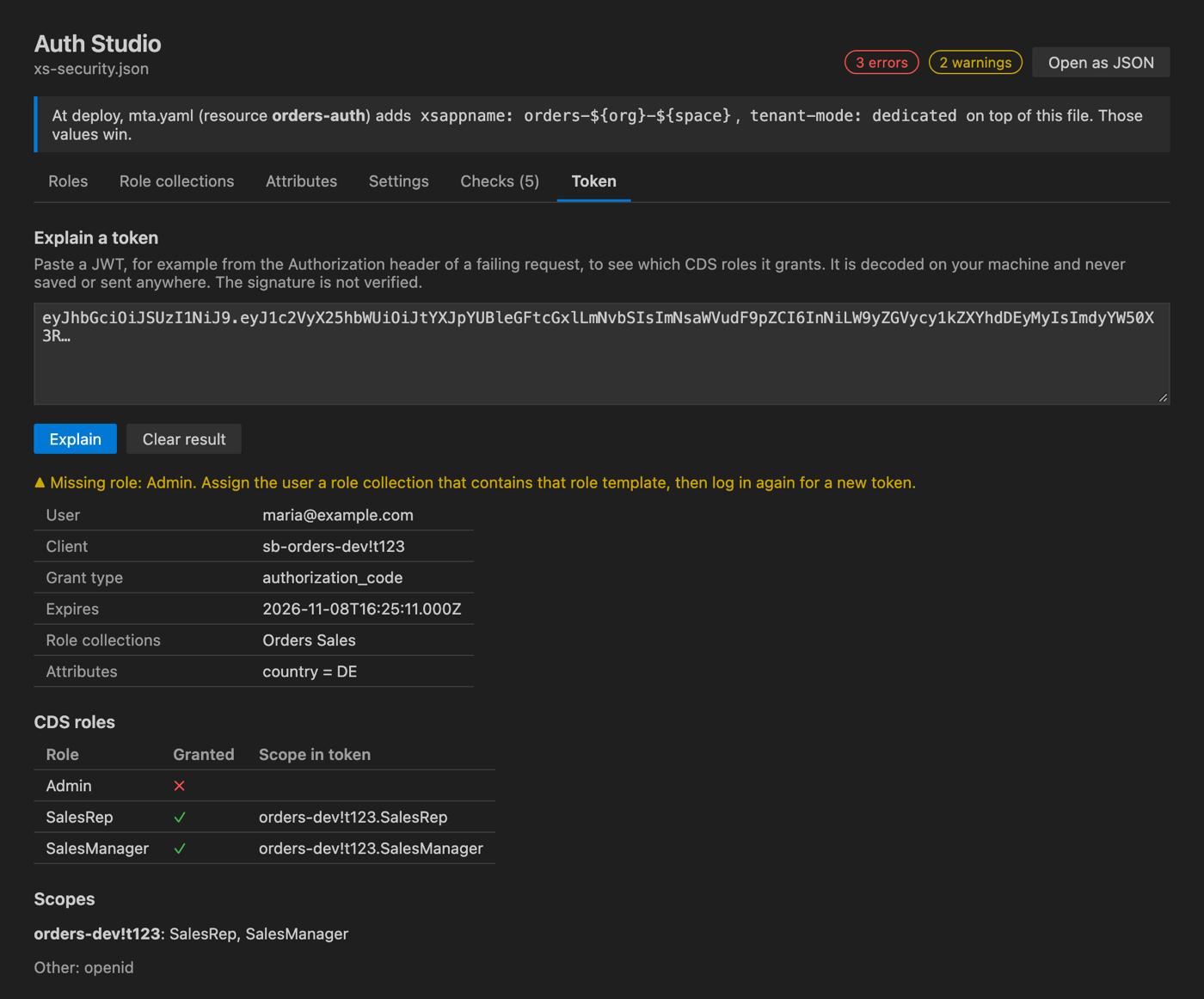
The token is decoded on your machine and never stored or sent anywhere.
Prevent it before the next deploy
Deploy Doctor for SAP BTP, the companion extension, runs the same role checks on every save, and as a command-line check you can run before deploying. On the example project it reports:
✖ error    Role "Admin" is not defined in xs-security.json
           AUTH001 srv/order-service.cds:12
           The CDS model requires role "Admin", but xs-security.json has
           no scope "$XSAPPNAME.Admin". Nobody can be given this role, so
           every request that needs it fails with 403 Forbidden.
           Auto-fix: Add scope and role template "Admin" to xs-security.json

✖ error    Role template "SalesManager" references unknown scope
           "$XSAPPNAME.SalesManagr"  AUTH003 xs-security.json:16
           Auto-fix: Change to "$XSAPPNAME.SalesManager"

▲ warning  User attribute "country" is not defined in xs-security.json
           AUTH006 srv/order-service.cds:7
It also explains the 403 if it already happened: paste the log, or fetch it with cf logs, and it names the missing role and the fix.
Using Identity Authentication (IAS) instead of XSUAA? Roles then come from AMS policies in
.dclfiles, not fromxs-security.json, and the most common cause of 403 is a CDS role that no policy assigns. Auth Studio has a separate view for AMS policies, and Deploy Doctor checks them too.
Key takeaways
- 403 means the user is logged in but the token lacks a role. 401 means no valid token arrived.
- A role reaches a user through scope, role template, role collection, assignment and a new login. Check them in that order.
- Role names are case-sensitive, and tokens from another space's XSUAA instance never match.
- After any change to roles, users must log in again.
- Check roles before each deploy instead of after the first 403. The free tools above do it automatically.