
Deploy Doctor for SAP BTP
Catch SAP BTP deployment mistakes before cf deploy.
An extension for VS Code and SAP Business Application Studio that checks your CAP, Fiori and multitenant projects as you work, fixes most problems in one click, and explains failed deploy and app logs, including 401 and 403 errors.
Free and open source (Apache 2.0) · Version 0.2.0 preview, November 2026 · Made by Hemanth Kodhanda, HAVISUN Technologies
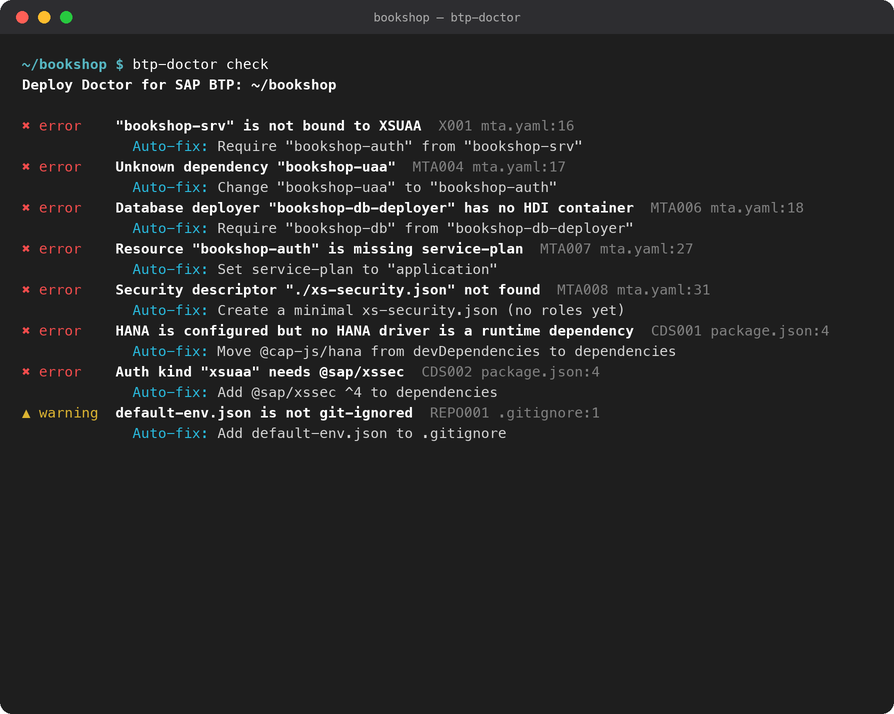
Find it, fix it, understand it
Deployment problems on SAP BTP usually show up late, after a build and a long cf deploy. Deploy Doctor moves them into your editor.
Checks while you work
Problems appear in the Problems panel and on the exact line of mta.yaml, package.json, .cdsrc.json, xs-security.json, .cds and .dcl files, manifest.json, xs-app.json and ui5-deploy.yaml, and are re-checked every time you save.
One-click fixes
Click the lightbulb to fix a problem, or use Fix All for every fix that needs no decision. Fixes go through the editor, so Undo works, and they keep the file's formatting and comments.
Explains failed deploys
Paste cf deploy output, or fetch cf logs --recent or an MTA deploy operation log, and get the known cause and the fix, including why a request got 401 or 403.
Mistakes that break a deploy, or the app after it
Covers SAP CAP Node.js services, Fiori and UI5 apps in the HTML5 application repository (managed approuter, SAP Build Work Zone, Application Frontend service) and multitenant SaaS apps built with CAP MTX. CAP Java and Kyma are not covered yet.
CAP service
- The service is not bound to XSUAA or the destination service in
mta.yaml. @sap/xssecor the HANA driver is only a dev dependency, so the app crashes after deploy.- Mock authentication is still active in production, or
cds buildnever runs.
Roles and login New in 0.2
- A role in
@requiresor@restricthas no scope or role template, so users get 403. - A role template or role collection points to something that does not exist, so XSUAA rejects the deploy.
- The approuter is not bound to XSUAA, or a destination does not forward the login token (401).
AMS policies on IAS New in 0.2
- A CDS role that no policy assigns, or a policy assigning a misspelled role.
- A
USEof a policy that does not exist, or an attribute missing fromschema.dcl. - No module in
mta.yamldeploys the policies, or@sap/amsis only a dev dependency.
Fiori apps and Work Zone
- The artifact name in
mta.yamldoes not match the zip the UI5 build creates. sap.cloud.servicedoes not match, or a route uses a misspelled destination.- The app is missing what SAP Build Work Zone needs to list it (
sap.cloud.public, a navigation inbound).
Multitenant apps
@sap/cds-mtxsis missing at runtime, or XSUAA is not shared between tenants.- Service Manager or the SaaS registry is missing.
- The approuter has no
TENANT_HOST_PATTERN.
Sizing, cost and repository
- Memory far above what the app needs, or a HANA Cloud database created and deleted with the MTA.
- A paid application logging plan where a free one would do.
.envordefault-env.jsonwith credentials is not git-ignored.
Tested on 20 public SAP sample projects, including SAP-samples/cap-sflight and btp-cap-multitenant-saas. The AMS checks were validated against SAP's own policy compiler and AMS sample projects.
From a log line to the cause
Real output from the example project in the repository. Each explanation quotes the log line, names the cause and says what to change. Error lines no known pattern explains are listed too.
Found 4 known problems in 11 log lines

2. No valid token in the request  line 8 · token-missing
   > GET /odata/v4/order/Orders 401 Unauthorized - Error: Invalid token: jwt must be provided
   The request reached the service without a usable user token. Behind an approuter,
   this usually means the destination to the service does not forward the token.
   Fix: Set forwardAuthToken: true on the approuter destination, or
   HTML5.ForwardAuthToken: true for the managed approuter.

3. User lacks a required role  line 9 · cap-missing-role
   > [cds] - 403 - Forbidden { reason: "User 'maria@example.com' is lacking required roles: [Admin]" }
   CAP rejected the request with 403 because the user does not have the required role(s): Admin.
   Fix: Assign the user a role collection that contains the role template for Admin
(BTP cockpit > Security > Users), then log out and in again so the new token carries it.Your editor, your pipeline, your AI assistant
VS Code
Install from the Visual Studio Marketplace.
SAP Business Application Studio
Install from Open VSX, the extension registry BAS uses.
Command line for CI
Run the same checks in your build pipeline with the command-line tool in the GitHub repository.
MCP server for AI assistants
Lets Claude Code, GitHub Copilot and Cursor check, fix and diagnose your project. Available in the GitHub repository.

Working on roles? Try Auth Studio
A visual editor for xs-security.json and AMS policies, checked against your CAP model, with a local token decoder. It runs the same role and login checks.
Runs on your machine. Your code stays there.
No telemetry and no network calls of its own. Only the log commands call your local Cloud Foundry CLI. The source is open under the Apache 2.0 licence, so you can read exactly what it does.
Not affiliated with or endorsed by SAP SE. SAP, SAP BTP, SAP Business Application Studio and SAP Fiori are trademarks or registered trademarks of SAP SE in Germany and other countries.
Building on SAP BTP?
HAVISUN Technologies helps teams design, build and deploy on SAP BTP: CAP services, Fiori apps, security, integration and multitenant SaaS. Tell us about your project and we reply within one business day.